Showing posts with label Photoshop CS5. Show all posts
Showing posts with label Photoshop CS5. Show all posts
Sunday, October 14, 2012

Thursday, September 6, 2012
Logo Ideas
 A study of potential logos for my Brother-in-law's dermatology practice. None of them were ever used, but It was nice to think things through.





Monday, July 9, 2012
Science Demo
Paige needed a visual of the layers that make up the earth, made up of transparencies. Something that could be turned into an interactive hands on demo consisting of a set of cutouts or transparencies. Here is what I came up with for her.
Atmosphere and Hydrosphere

Crust

Mantle

Lithosphere

Asthenosphere

Outer Core

Inner Core

The Full Image

Hand Painting Textures
This was an exercise in hand painting textures, then creating Normal and Displace textures from the color map.
The color map was created using some elephant and crocodile skin images. The model was pulled into Photoshop and painting directly onto the color layer. Additional fine tuning was done on the flat color layer image.
The gray areas are from the Elephant Skin, and the green are from the Crocodile skin.

The Diffuse, Displace and Normal layers were created using a trial version of CrazyBump, then pulling those images into Photoshop and cleaning up the problem areas or removing the texture from the spots where they were not wanted. This took a while as crazy pump treated all the boundaries between color sections as if they were changes in height. The color layer had to be run through CrazyBump as a grayscale image, then much work had to be done to "equalize" the sections into a topographical map of sorts. color map
 Diffuse Layer - this tells the render engine where to increase or decrease shadows. Think of it as adding dirt.
 Displacement Layer - This tells the renderer to physically distort the model. This adds large bumps to the model. It is easier to add features this way rather than modeling them, but they also render faster this way as well.
 Normals Layer - This layer warps the shadow. It tells the renderer to bend the light, giving the illusion of creases and fine detail. This does not physically distort the mesh, but is also a great way to add fine detail without making the image render slower.
Here is the finished project without the displacement map:

And here it is with the displacement:
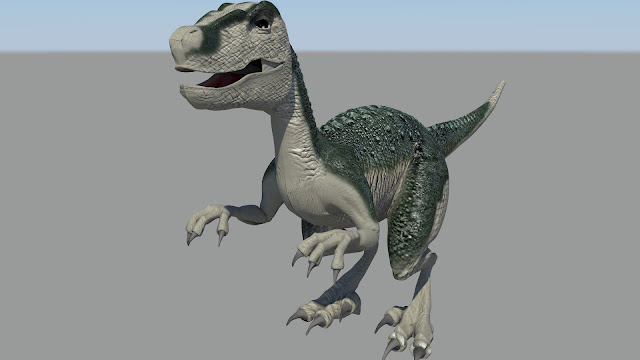
The color map was created using some elephant and crocodile skin images. The model was pulled into Photoshop and painting directly onto the color layer. Additional fine tuning was done on the flat color layer image.
The gray areas are from the Elephant Skin, and the green are from the Crocodile skin.
The Diffuse, Displace and Normal layers were created using a trial version of CrazyBump, then pulling those images into Photoshop and cleaning up the problem areas or removing the texture from the spots where they were not wanted. This took a while as crazy pump treated all the boundaries between color sections as if they were changes in height. The color layer had to be run through CrazyBump as a grayscale image, then much work had to be done to "equalize" the sections into a topographical map of sorts. color map
Here is the finished project without the displacement map:

And here it is with the displacement:

Monday, November 28, 2011
An Open Invitation
 |
| My invitation for you to our show. |
My Digital Photography Class is doing a fine art show. Typically this would be a 3 month thing, but the place the class did it last semester worked out so well that the art department swooped in and reserved it for the next 6 months. So instead we are showing one night only at the Repartee Gallery at University Mall. I have 7 images in the show, but some of the other folks in the class are extremely talented. If you are available the evening of December 12 you ought to come check it out.
Monday, October 3, 2011
Playing with HDR
In my Photography and Compsiting 2 class we have been playing with advanced HDR and Panorama Options. We have been ranging from the photorealistic all the way down into the surrealistic. Check out some samples.
Alpine Loop1

Alpine Loop2

Alpine Loop3 - This one was interesting. We set up the tripod and marked its location with rocks. I took the Panorama, then I came back that night and took the panorama again to get the stars. Lesson Learned from this: Never play Jazz in the Canyon at night. You will attrack Elk. I left before it actually reached me, because Amorous or Angry, I did not want to find out.

Alpine Loop3 - Detail

Mount Timp1

Mount Timp 1 - Detail

Mount Timp2

Alpine Loop1

Alpine Loop2

Alpine Loop3 - This one was interesting. We set up the tripod and marked its location with rocks. I took the Panorama, then I came back that night and took the panorama again to get the stars. Lesson Learned from this: Never play Jazz in the Canyon at night. You will attrack Elk. I left before it actually reached me, because Amorous or Angry, I did not want to find out.

Alpine Loop3 - Detail

Mount Timp1

Mount Timp 1 - Detail
Mount Timp2

Friday, May 6, 2011
Semester Final
Grades were posted. Thanks to my abysmal math class grade I got a 3.4 something or other. This brought my total GPA down to a 3.8 even. Thankfully I had a bunch of other classes that kept my GPA afloat. Classes that, no offense to those who love math, I will actually use in my career. (Nathan says higher math exists to give jobs to mathematicians.)
So I came here today to post my Photoshop final. I had to do something outside my normal realm of skill, so here we go. I went online and found a random photo of the British natural history museum, and following the theme of my last big Photoshop Class Project I proceeded to play around with it.
Here is the original:
First thing to do was to remove everyone from the building, fix some of the digital image artifacts, and play with the color. If you look, you will notice that almost every part of the building that is obscured by someone is visible somewhere else. So it was just a matter of cutting and pasting the pertinent parts, the distorting till they line up with the underlying area.Some areas i knew would not be visible in the final image, so I did not bother fixing those spots.
The end result is right here:

Keeping with this semesters uncharacteristic post apocalyptic theme, I vented some of anger towards math onto the canvas using some alternate sources like the ones shown below:
 I also found that sometimes you just have to paint in features. So I grabbed the Photoshop brush manipulation dialog and Got all Bob Ross on it. I first added some dirt, and then I painted a Happy Little Waterfall.

Then I added some happy Little Ivy and some Happy Little Plants.

Some final color manipulation, and voila:
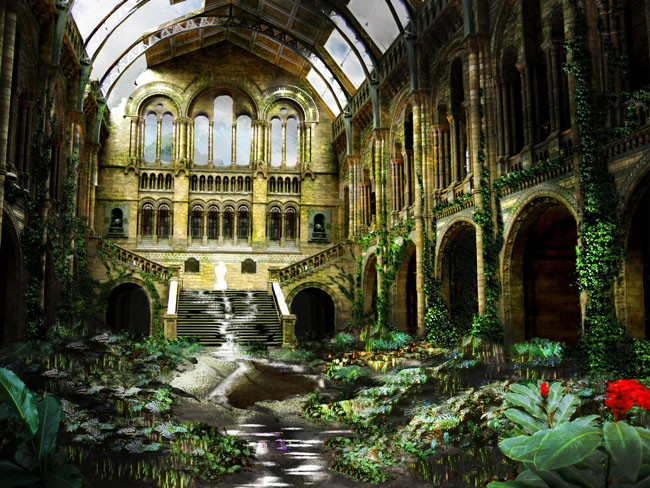
One post apocalyptic Scene suitable for framing.
So I came here today to post my Photoshop final. I had to do something outside my normal realm of skill, so here we go. I went online and found a random photo of the British natural history museum, and following the theme of my last big Photoshop Class Project I proceeded to play around with it.
Here is the original:
 |
| Note: I cannot find the source for the original. If by some odd chance you who took this picture are actually reading this, no malice is intended in the use of your image, and as a student I do have a legal right to use images for projects that are not for profit. |
First thing to do was to remove everyone from the building, fix some of the digital image artifacts, and play with the color. If you look, you will notice that almost every part of the building that is obscured by someone is visible somewhere else. So it was just a matter of cutting and pasting the pertinent parts, the distorting till they line up with the underlying area.Some areas i knew would not be visible in the final image, so I did not bother fixing those spots.
The end result is right here:
Keeping with this semesters uncharacteristic post apocalyptic theme, I vented some of anger towards math onto the canvas using some alternate sources like the ones shown below:
Then I added some happy Little Ivy and some Happy Little Plants.
Some final color manipulation, and voila:
One post apocalyptic Scene suitable for framing.
Friday, March 18, 2011
a Little Photoshop Project
Until today, I have done nothing exciting enough to show off this semester. Most of my classes have been fairly easy (College Algebra the noted exception.). Take the required Photoshop course I am taking right now. Please.
One of this weeks assignments was to create an advertisement for "the local hiking club you belong to" that encourages people to throw away trash (PREACHY!) Because all my assignments this semester have back story. Seriously. Photoshop, excel, Access, Word... They all start with a paragraph that begins with some variation of "You work for a company...". Apparently we are only capable of learning applied principles. Something that STILL does not apply to math classes.
I digress. This assignment had to feature "a landscape, a sign, one large inanimate object (To be partially buried) and two or more smaller objects. Plus text that advertises the above mentioned club. Well if you are like me, burying a large inanimate object leads to only one conclusion.
Here is (Are) my landscape source(s):


Here is my "sign":

My two "smaller" objects:


And Finally, my "Large inanimate object":

**Disclaimer: I would like to note, that as a digital media student, I have a legal right to use any source for any assignment, as long as the assignment is not for profit**
Here is the final result: (Click for Larger)

Here it is without the extra gunk:

In Loving Memory of Charlton Heston, who said I could have his guns now that he has passed on.
(come on people, If I have to explain these jokes they stop being funny.)
Subscribe to:
Posts (Atom)