Tuesday, May 31, 2011

Saturday, May 14, 2011
Friday, May 6, 2011
Semester Final
Grades were posted. Thanks to my abysmal math class grade I got a 3.4 something or other. This brought my total GPA down to a 3.8 even. Thankfully I had a bunch of other classes that kept my GPA afloat. Classes that, no offense to those who love math, I will actually use in my career. (Nathan says higher math exists to give jobs to mathematicians.)
So I came here today to post my Photoshop final. I had to do something outside my normal realm of skill, so here we go. I went online and found a random photo of the British natural history museum, and following the theme of my last big Photoshop Class Project I proceeded to play around with it.
Here is the original:
First thing to do was to remove everyone from the building, fix some of the digital image artifacts, and play with the color. If you look, you will notice that almost every part of the building that is obscured by someone is visible somewhere else. So it was just a matter of cutting and pasting the pertinent parts, the distorting till they line up with the underlying area.Some areas i knew would not be visible in the final image, so I did not bother fixing those spots.
The end result is right here:

Keeping with this semesters uncharacteristic post apocalyptic theme, I vented some of anger towards math onto the canvas using some alternate sources like the ones shown below:
 I also found that sometimes you just have to paint in features. So I grabbed the Photoshop brush manipulation dialog and Got all Bob Ross on it. I first added some dirt, and then I painted a Happy Little Waterfall.

Then I added some happy Little Ivy and some Happy Little Plants.

Some final color manipulation, and voila:
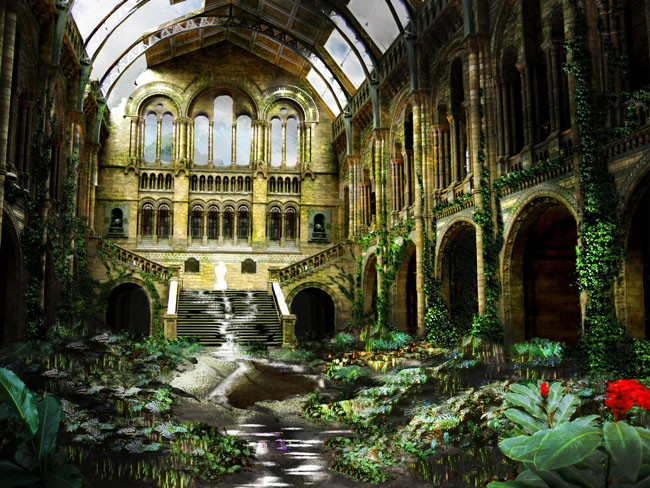
One post apocalyptic Scene suitable for framing.
So I came here today to post my Photoshop final. I had to do something outside my normal realm of skill, so here we go. I went online and found a random photo of the British natural history museum, and following the theme of my last big Photoshop Class Project I proceeded to play around with it.
Here is the original:
 |
| Note: I cannot find the source for the original. If by some odd chance you who took this picture are actually reading this, no malice is intended in the use of your image, and as a student I do have a legal right to use images for projects that are not for profit. |
First thing to do was to remove everyone from the building, fix some of the digital image artifacts, and play with the color. If you look, you will notice that almost every part of the building that is obscured by someone is visible somewhere else. So it was just a matter of cutting and pasting the pertinent parts, the distorting till they line up with the underlying area.Some areas i knew would not be visible in the final image, so I did not bother fixing those spots.
The end result is right here:
Keeping with this semesters uncharacteristic post apocalyptic theme, I vented some of anger towards math onto the canvas using some alternate sources like the ones shown below:
Then I added some happy Little Ivy and some Happy Little Plants.
Some final color manipulation, and voila:
One post apocalyptic Scene suitable for framing.
Thursday, April 7, 2011
The Ongoing Project
The first model I made in Blender 3d back in December of 2005 was the salt lake temple. This model has become my test bed. Each time I find something new that speeds up render time, I strip this model down and rebuild it. For the first video clip you will see, each frame took over 3 hours to render. The file itself was 580mb. The version of the model in the Salt Lake water test was 60mb and each frame took 3 minutes to render. The second clip here is the progress of the most recent version of the model, now at about 4mb. It takes 45 seconds per frame, but as you can see, I am just getting started. each version of this model, as you can see between these two clips, gets more detailed even though the file size becomes significantly smaller. Additionally, as you will see in the old video, there are many things I did not understand about animation that come through in the old video. There is a significant amount of "unintentional movement." Things that move or flicker that should not.
The level of detail in the new video is significant, though unfinished. the clip is short, but watch it in fullscreen to get a real feel for the details. Someday when school is not driving me ragged, I will have a chance to finish some of these projects. Maybe.
The original
The current
The level of detail in the new video is significant, though unfinished. the clip is short, but watch it in fullscreen to get a real feel for the details. Someday when school is not driving me ragged, I will have a chance to finish some of these projects. Maybe.
The original
The current
Friday, March 18, 2011
a Little Photoshop Project
Until today, I have done nothing exciting enough to show off this semester. Most of my classes have been fairly easy (College Algebra the noted exception.). Take the required Photoshop course I am taking right now. Please.
One of this weeks assignments was to create an advertisement for "the local hiking club you belong to" that encourages people to throw away trash (PREACHY!) Because all my assignments this semester have back story. Seriously. Photoshop, excel, Access, Word... They all start with a paragraph that begins with some variation of "You work for a company...". Apparently we are only capable of learning applied principles. Something that STILL does not apply to math classes.
I digress. This assignment had to feature "a landscape, a sign, one large inanimate object (To be partially buried) and two or more smaller objects. Plus text that advertises the above mentioned club. Well if you are like me, burying a large inanimate object leads to only one conclusion.
Here is (Are) my landscape source(s):


Here is my "sign":

My two "smaller" objects:


And Finally, my "Large inanimate object":

**Disclaimer: I would like to note, that as a digital media student, I have a legal right to use any source for any assignment, as long as the assignment is not for profit**
Here is the final result: (Click for Larger)

Here it is without the extra gunk:

In Loving Memory of Charlton Heston, who said I could have his guns now that he has passed on.
(come on people, If I have to explain these jokes they stop being funny.)
Tuesday, December 21, 2010
Sunday, December 19, 2010
Subscribe to:
Posts (Atom)